
May
12

Mobile ItemRenderer in ActionScript (Part 4)

24 comments Posted by: Nahuel Foronda

This is part 4 of my series on item renderers. This time we have a more real example that includes two states (selected and up) plus and avatar image and a bunch of text fields.

What I choose as the example is a TweetRenderer that shows the picture of the user, the user name and the content of the tweet.

For reference these are the previous posts: part 1, part 2, and part 3.
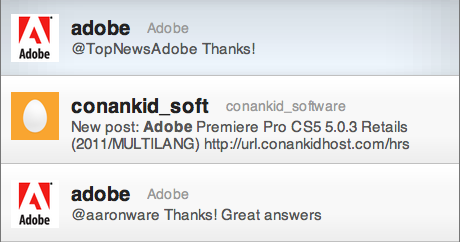
To simplify the code, I call the twitter service with a hardcoded value "Adobe" to receive all the tweets that include that word. As you may notice, I'm not following the best practices with services and added them in the Application file.

<?xml version="1.0" encoding="utf-8"?>
<s:Application xmlns:fx="http://ns.adobe.com/mxml/2009"
            xmlns:s="library://ns.adobe.com/flex/spark"
            creationComplete="creationCompleteHandler()">

   
   <fx:Style source="styles/Main.css"/>
   
   <fx:Script>
      <![CDATA[
         import mx.collections.ArrayCollection;
         import mx.events.FlexEvent;
         [Bindable]
         private var ac:ArrayCollection = new ArrayCollection();
         private var searchURL:String = "http://search.twitter.com/search.atom?q=";
         protected function creationCompleteHandler():void
         {
            httpService.url = searchURL + "Adobe";
            httpService.send();
         }
      ]]>
   </fx:Script>
   <fx:Declarations>
      <s:HTTPService id="httpService"
                  result="ac = event.result.feed.entry as ArrayCollection" />

   </fx:Declarations>
   <s:List width="100%" height="100%"
         dataProvider="{ac}"
         itemRenderer="renderers.TweetRenderer"/>

</s:Application>

Styles

Now that we have more elements, our styles are growing a little bit.
We do not longer have the background-color property, because we are using images to paint the background instead. We have 2 images, one for the selected state and another for the rest (in this case we have only one, the up state). We use the pseudo selectors to target the different states but in both cases the name of the property is "background".

Other thing that we have now is individual style classes for the different text fields of the renderer. We have one for the name, one for the username and another for the content.

renderers|TweetRenderer
{
   padding-top: 15;
   padding-left: 10;
   padding-right: 10;
   padding-bottom: 15;
   horizontal-gap: 10;
   vertical-gap: 10;
   
   name-style: nameRendererStyle;
   user-style: userRendererStyle;
   content-style: contentRendererStyle;
   separator: Embed(source='/styles/images/separator.png' );
   
   background: Embed(source='/styles/images/background_up.png',
      scaleGridLeft=10, scaleGridTop=20, scaleGridRight=11, scaleGridBottom=21 );
}

renderers|TweetRenderer:selected
{
   background: Embed(source='/styles/images/background_down.png',
      scaleGridLeft=50, scaleGridTop=20, scaleGridRight=51, scaleGridBottom=21 );
}
.userRendererStyle
{
   font-size: 20;
   color: #222222;
   font-family: _sans;
   font-weight: bold;
}
.nameRendererStyle
{
   font-size: 14;
   color: #999999;
   font-family: _sans;
}
.contentRendererStyle
{
   font-size: 15;
   color: #555555;
   font-family: _sans;
}

Renderer

Because we want change the background when the user clicks in the item we need to implement the interface IItemRenderer, that allow the List to notify the renderers every time the selection changes. The help us with that task we create another class, the BaseRenderer that takes cares of the implementation of that interface and the TweetRenderer extends from it.

package renderers
{
   import core.StyleClient;
   import spark.components.IItemRenderer;
   public class BaseRenderer extends StyleClient implements IItemRenderer
   {
      // Public Setters and Getters
      
      protected var _data:Object;
      public function set data( value:Object ):void
      {
         if( _data == value )
            return;
         
         _data = value;
         // if the elements has been created we set the values
         if( creationComplete )
            setValues();
      }
      public function get data( ):Object
      {
         return _data;
      }
      // selected-------------------------------------------------------------
      protected var _selected:Boolean = false;
      public function get selected():Boolean
      {
         return _selected;
      }
      public function set selected(value:Boolean):void
      {
         if (value != _selected)
         {
            _selected = value;
            updateSkin();
         }
      }
      // dragging------------------------------------------------------------
      /** Property not used but it is required by the interface IItemRenderer */
      protected var _dragging:Boolean;
      public function set dragging( value:Boolean ):void
      {
         _dragging = value;
      }
      public function get dragging():Boolean
      {
         return _dragging;
      }
      // showsCaret-------------------------------------------------------------
      /** Property not used but it is required by the interface IItemRenderer */
      protected var _showsCaret:Boolean;
      public function set showsCaret( value:Boolean ):void
      {
         _showsCaret = value;
      }
      public function get showsCaret():Boolean
      {
         return _showsCaret;
      }
      // itemIndex--------------------------------------------------------------
      protected var _itemIndex:int;
      public function set itemIndex( value:int ):void
      {
         _itemIndex = value;
      }
      public function get itemIndex():int
      {
         return _itemIndex;
      }
      // itemIndex--------------------------------------------------------------
      protected var _label:String;
      public function get label():String
      {
         return _label;
      }
      public function set label(value:String):void
      {
         _label = value;
      }
      // --------------------------------------------------------------
      protected function updateSkin():void
      {
         // To be implemented in children
      }
      protected function setValues():void
      {
         // To be implemented in children
      }
   }
}

I added 2 methods to this base class: setValues which is called every time that the data changes and updateSkin which is called every time that the selection changes.

In the method updateSkin that is implemented in the TweetRenderer we change the state of the skin. Changing the state gives us new values for our call to the getStyle method. For example, when we change to the "selected" state and we call getStyle( "background" ) we get the image that is defined inside the pseudo selector TweetRenderer:selected. When we are in the "up" state, we get the default value for the background property. All this CSS functionally is provided by extending StyleClient.

You can see that in the following code

package renderers
{
   import flash.display.DisplayObject;
   import flash.text.TextField;
   import spark.primitives.BitmapImage;
   import spark.primitives.Graphic;
   import utils.TextUtil;
   public class TweetRenderer extends BaseRenderer
   {
      // Protected properties   
      protected var userField:TextField;
      protected var nameField:TextField;
      protected var contentField:TextField;
      protected var avatar:BitmapImage;
      protected var avatarHolder:Graphic;
      protected var background:DisplayObject;
      protected var backgroundClass:Class;
      protected var separator:DisplayObject;
      protected var paddingLeft:int;
      protected var paddingRight:int;
      protected var paddingBottom:int;
      protected var paddingTop:int;
      protected var horizontalGap:int;
      protected var verticalGap:int;

      // Contructor
      public function TweetRenderer()
      {
         percentWidth = 100;
      }
      
      // Override Protected Methods
      override protected function createChildren():void
      {
         readStyles();
         setBackground();
         var separatorAsset:Class = getStyle( "separator" );
         if( separatorAsset )
         {
            separator = new separatorAsset();
            addChild( separator );
         }
         userField = TextUtil.createSimpleTextField( getStyle( "userStyle" ) );
         addChild( userField );
         nameField = TextUtil.createSimpleTextField( getStyle( "nameStyle" ) )
         addChild( nameField );
         contentField = TextUtil.createSimpleTextField( getStyle( "contentStyle" ) , false, "none" );
         contentField.wordWrap = true;
         contentField.multiline = true;
         addChild( contentField );
         avatarHolder = new Graphic();
         avatar = new BitmapImage();
         avatar.fillMode = "clip";
         avatarHolder.width = 48;
         avatarHolder.height = 48;
         avatarHolder.addElement( avatar );
         addChild( avatarHolder );
         // if the data is not null, set the text
         if( data )
            setValues();
      }
      
      protected function setBackground():void
      {
         var backgroundAsset:Class = getStyle( "background" );
         if( backgroundAsset && backgroundClass != backgroundAsset )
         {
            if( background && contains( background ) )
               removeChild( background );
            
            backgroundClass = backgroundAsset;
            background = new backgroundAsset();
            addChildAt( background, 0 );
            if( layoutHeight && layoutWidth )
            {
               background.width = layoutWidth;
               background.height = layoutHeight;
            }
         }
      }

      override protected function updateDisplayList( unscaledWidth:Number, unscaledHeight:Number ):void
      {
         avatarHolder.x = paddingLeft;
         avatarHolder.y = paddingTop;
         avatarHolder.setLayoutBoundsSize( avatarHolder.getPreferredBoundsWidth(), avatarHolder.getPreferredBoundsHeight() );      
         userField.x = avatarHolder.x + avatarHolder.width + horizontalGap;
         userField.y = paddingTop;
         nameField.x = userField.x + userField.textWidth + horizontalGap;
         nameField.y = paddingTop + ( userField.textHeight - nameField.textHeight ) / 2;
         contentField.x = avatarHolder.x + avatarHolder.width + horizontalGap;
         contentField.y = paddingTop + userField.textHeight + verticalGap;
         contentField.width = unscaledWidth - paddingLeft - paddingRight - avatarHolder.getLayoutBoundsWidth() - horizontalGap;
         layoutHeight = Math.max( contentField.y + paddingBottom + contentField.textHeight, avatarHolder.height + paddingBottom + paddingTop );
         background.width = unscaledWidth;
         background.height = layoutHeight;
         separator.width = unscaledWidth;
         separator.y = layoutHeight - separator.height;
      }
      
      override public function getLayoutBoundsHeight(postLayoutTransform:Boolean=true):Number
      {
         return layoutHeight;
      }
      override protected function setValues():void
      {
         var arr:Array = String( data.author.name ).split("(");
         var user:String = String( data.author.name )
         userField.text = arr[0];
         nameField.text = String( arr[ 1 ] ).replace( ")", "" );
         contentField.htmlText = data.content.value;
         if( data.link.length > 1)
            avatar.source = data.link[ 1 ].href;
      }
      
      override protected function updateSkin():void
      {
         currentCSSState = ( selected ) ? "selected" : "up";
         setBackground();
      }
      
      protected function readStyles():void
      {
         paddingTop = getStyle( "paddingTop" );
         paddingLeft = getStyle( "paddingLeft" );
         paddingRight = getStyle( "paddingRight" );
         paddingBottom = getStyle( "paddingBottom" );
         horizontalGap = getStyle( "horizontalGap" );
      }
   }
}

We also have now more children to create and layout. We have an image to load for the avatar, the embedded images for the background and a bunch of text fields. For the text fields, we use the same TextUtil to help us on the task of reading the styles and setting the properties. You may notice that we have 3 different styles, one for each text field. The TextUtil can read the styles from a class or from the type selector or current object ("this"). In this case we use 3 different classes.

The other thing that I implemented in this renderer is the ability to have variable height. To make it work with the list I just override the method getLayoutBoundsHeight that returns the height of the renderer after the layout is done. The List will use that value to layout all the items one after the other even if the height is different for each renderer.

The source is available for download.

Category: Flex | Mobile |

24 Comments so far

Write yours
Lee Burrows
Hi Nahuel,

Great set of articles on renderers - very clear and informative. Thanks a lot.

I've heard that getStyle is quite an expensive call? Is that something that should be limited when creating a mobile renderer?

Cheers,

Lee
Nahuel Foronda
Lee, my understanding is that setStyle is very expensive but getStyle is not.
john
3. john wrote on July 01, 2011 at 4:18 PM
Hello Lee,
thank you for this really great article about mobile Item Renderers! This helped me A LOT!

I have a problem thought.
I want to use embedded fonts for my textFields that I create using "TextUtil.createSimpleTextField(this)" but it seems I cant get them to render properly..
I am using the following attributes in my main.css:

@font-face
{
   src: url("assets/fonts/Base6.ttf");
   fontFamily: iOSFontCFF;
   fontStyle: normal;
   fontWeight: bold;
   embedAsCFF: true;
   advancedAntiAliasing: true;   
}

@font-face
{
   src: url("assets/fonts/Base6.ttf");
   fontFamily: iOSFontNonCFF;
   fontStyle: normal;
   fontWeight: bold;
   embedAsCFF: false;
   advancedAntiAliasing: true;   
}


renderers|ZCategoryRenderer
{
   font-family: iOSFontNonCFF;   
   padding-left: 6;
   padding-right: 10;
   padding-top: 6;
   padding-bottom: 8;
   font-size: 14;
   fontWeight:bold;
   name-field-font-color : #000000;
   number-field-font-color : #ffffff;   
   name-field-drop-shadow: #ffffff;
   number-field-drop-shadow: #000000;
}

It seems my textFields in ZCategoryRenderer get all the styling except the "font-family"...
The same font WORKS for spark buttons and Labels in my application (iOSFontNonCFF/iOSFontCFF)

Any ideas?
Thanks.
john
4. john wrote on July 02, 2011 at 5:27 AM
I have found the solution to my problem.
Inside ZTextUtil.as in the method createSimpleTextField I just had to add "textField.embedFonts = true".

Thanks again!
msmdesign
this really helped my project, thanks heaps dude. some notes:

When using AS instead of Flex component the list.dataGroup.measuredSize fires as 0.

When loading in different sized images to the avatar the images get stretched to fit avatarHolder.

If anyone has been able to work around can please post ideas, thanks.

Again, great post on using AS3/CSS for item renderes, thanks.
Nahuel Foronda
You can change the size of the holder with the following method:
avatarHolder.setLayoutBoundsSize( width, height );
You can calculate the size of your images and set the size of the holder proportionally.

Regarding the list.dataGroup.measuredSize you can override the getPreferredBoundsHeight(postLayoutTransform:Boolean=true):Number function in your renderer to give the list a preferred value of the renderer, same with the width property.
msmdesign
Thanks for quick follow-up Nahuel, very much appreciated. I now have a modified version of your twitter renderer working great. My renderer has to load more data when scrolled to bottom and add it to the list, hence my measured size queries. I hope to run some tests on performance compared to spark renderes on a mobile device today.
vikas
8. vikas wrote on August 02, 2011 at 4:21 AM
Thanks alot.

By the way
verticalGap getStyle() is missing.
martin
9. martin wrote on August 02, 2011 at 6:36 PM
Initially the same as vikas - thanks, and also thanks vikas :)

But I have a strange issue with this - I have a list with a dataprovider, the source of which is an ordered array of value objects. At first glance, visually everything makes sense and looks great - but when I update the dataprovider with new data, two things happen.

1. The size of the list isn't immediately updated - the scroll bar displays as if it only had a very small amount of information - however when I throw the list it resizes to the correct value as it goes towards the bottom of the list - this also happens in your example.

2. As I mentioned, my data provider is an ordered list, depending on certain flags, items at the top have different backgrounds, so I can immediately see the order in which items are rendered - for some reason, occasionally the list renders out of order - I have tried everything I can think of to resolve this - from Sort/SortFields to newing up the dataprovider but nothing seems to work.

If i revert to the standard item renderer both of these issues disappear. Which leads me to the conclusion that something strange is happening with the variable height code and measurement routines?

Much appreciated.
martin
10. martin wrote on August 02, 2011 at 7:06 PM
Ok - fixed issue one... I added

override protected function measure():void
      {
         var totalHeight:Number = Math.max( enterLabel.y + enterLabel.textHeight + paddingBottom, avatarHolder.height + paddingBottom + paddingTop );
         var totalWidth:Number = layoutWidth;
         
         measuredWidth = totalWidth;
         measuredHeight = totalHeight;
      }

Although you'd change the totalHeight part back to your own values - thanks to mercilesshacking out of http://corlan.org/2011/07/11/creating-flex-mobile-lists-part-ii-using-virtualization/
Nahuel Foronda
Hi Martin,
Make sure that when the data is set in your renderer you call setValues and update the values of your inner children, after that the list will call getPreferredBoundsHeight to get the size of each cell, you can override that function to give a specific value that will the depends on each of your child depending on the data that you set it on them.
Nahuel Foronda
I'm glad that is working now.
martin
13. martin wrote on August 02, 2011 at 7:30 PM
Seriously - thank you so much for the quick response - working perfectly now! Glad I solved at least one part on my own though - now I can go to bed :)
John Higgins
14. John Higgins wrote on August 11, 2011 at 3:05 PM
Great article. I need to implement a horizontal mobile image renderer in As3, is it possible to modify your code to allow this?
Nahuel Foronda
Hi John,
Yes it is possible, make sure that you remove percentWidth = 100; and provide a value in getPreferredBoundsWidth so the list can layout the children horizontally.
John Higgins
16. John Higgins wrote on August 12, 2011 at 6:59 AM
Hi Nahuel, thanks for the quick response. That worked great. I'm trying to modify the acceleration and de-acceleration of the scroll easing function so that I get a smoother scroll and a longer de-acceleration. Do you know if this can be done?
Sumit Arora
17. Sumit Arora wrote on December 03, 2011 at 2:25 AM
Hi,

Can you tell me how can we set variable row height property in mobile item renderer. I am struggling with that.

Regards,
Sumit Arora
Deepthi
18. Deepthi wrote on December 07, 2011 at 12:19 AM
Hi Nahuel Foronda,
Thanks for your great source on Item Renderers. I have a problem in List record selection.

In the spark list, I display 5 records. I select the 2 record. It goes to the Detail view. I click on Back Navigator button. It comes back to my list. This time, I reload the data as I can modify certain details in the Detail view. The problem what I face is, it does not highlight the 2nd record which was previously selected. The background image is not appearing for the 2nd record. How to apply the background once again for the previously selected row after the List is reloaded?

Regards,
Deepthi
Deepthi
19. Deepthi wrote on December 07, 2011 at 12:28 AM
Hi Nahuel Foronda,
I have one more question. In the function 'readTextFormat' (textUtil.as), how to set the textFormat as multiline and vertical center alignment?
Deepthi
20. Deepthi wrote on December 13, 2011 at 10:19 PM
Dear Nahuel Foronda,
Could you have some time to look at my issues. You can refer Point 18 and Point 19 comments. I got really stuck with these small issues but in a great sample.

Regards,
Deepthi
Patri
21. Patri wrote on December 21, 2011 at 12:26 AM
Now IAdvancedStyleClient interface requires the implementation of the method hasCSSState.

public function hasCSSState():Boolean
{
   if(_currentCSSState != null)
      return true;
   else
      return false;
}


Thank you very much for this great example.
Dmitry
22. Dmitry wrote on January 14, 2012 at 9:18 PM
Great tutorial, interesting approach esp. using SpriteVisualElement and supporting styling. Thanks for all that!
My only concern is when I set useVirtualLayout="true" the scroll bar no longer works correctly - it always moves to the bottom irrelevant of the position of the view port, then once you scroll it jerks on the bottom until you reach the last element in List. After that it starts working properly.
per
For some reason the first item in the list is always missing. It is displayed normally when using the default itemrenderer. I tried with different data, but get the same result. Any ideas?
Danut
24. Danut wrote on May 14, 2012 at 10:23 AM
How about disabling and item? What changes should be done in order to achieve this?

Leave your comment

Comment etiquette: As a gesture to those subscribed to this post, please keep your comments relevant to the post.

Your email address will never be displayed.
Email is gravatar enabled.Gravatar are the pictures you see next to the comments. If you like to have one, visit gravatar


Allowed tags:

<code>
All other tags will be shown as such, when in doubt, use the preview.

Leave this field empty:


Preview:

Refresh Preview
1. You wrote on